Notice: Image2CodeAI is winding down. Existing users can keep using the app while their current subscription remains active. New signups are closed.
Why Screenshot to Code?
Screenshots are everywhere - and now they can become code. Our AI understands visual layouts and translates them into clean, maintainable code instantly.
Any Screenshot Works
Web pages, designs, mockups, wireframes - any screenshot becomes code
Any Source
Convert screenshots from any device - Windows, Mac, or web browsers
Instant Results
Upload your screenshot and get working code in seconds
Multiple Outputs
Export to HTML/CSS, Tailwind CSS, or React components
Any Screenshot, Any Device
Upload screenshots from any source and watch Image2CodeAI transform them into production-ready code. Our AI handles web pages, designs, and mockups with high precision.
- Web page screenshots
- Design tool exports (Figma, Sketch, XD)
- Wireframes and mockups
- UI component screenshots
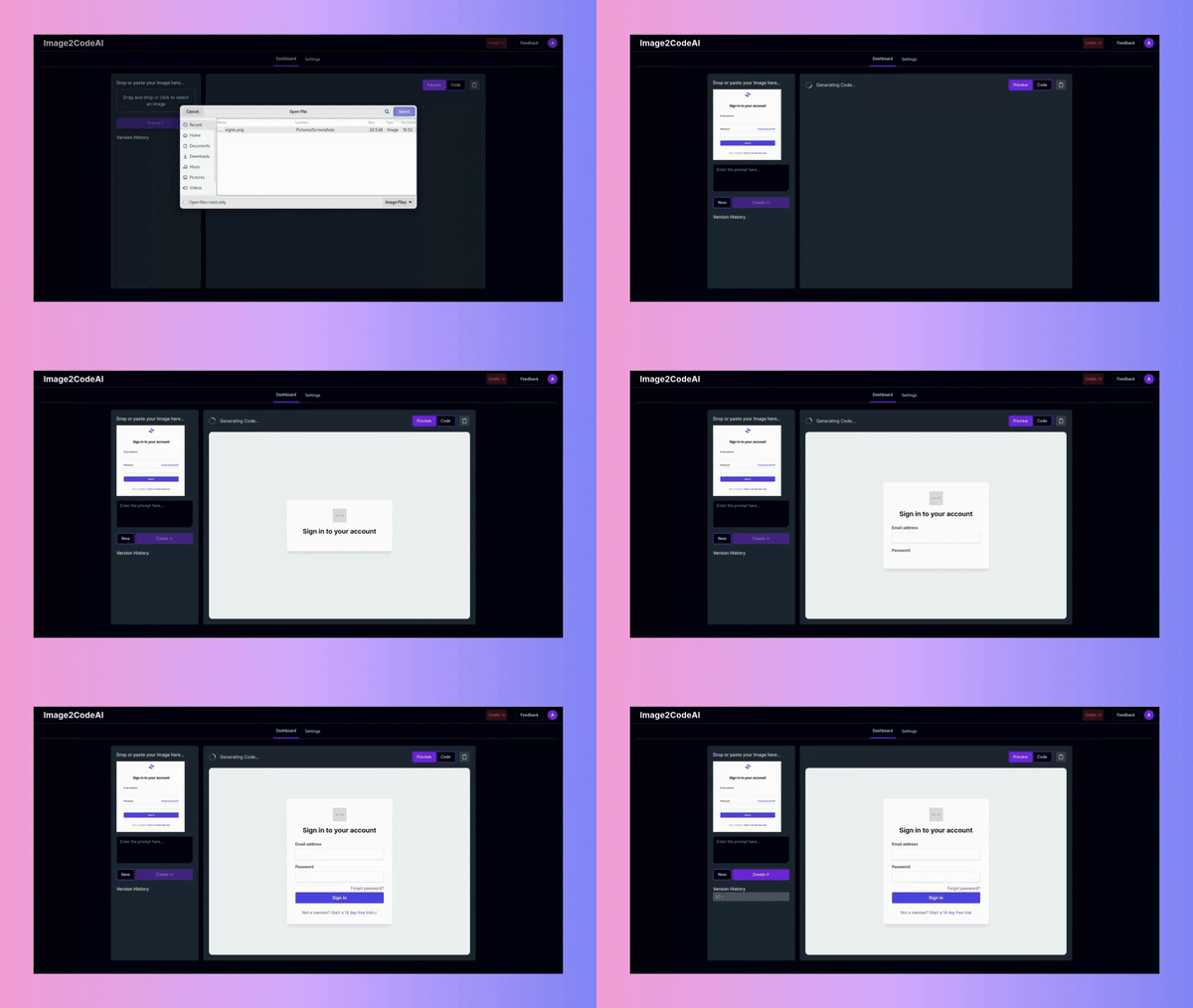
How to Convert Screenshots to Code
Turn any screenshot into working code in four simple steps.
Capture Your Screenshot
Take a screenshot of any UI you want to convert. Use your system's screenshot tool, browser extensions, or export from design tools. Higher resolution yields better results.
Upload to Image2CodeAI
Drag and drop your screenshot into the upload area or click to browse. We accept PNG, JPG, WEBP, and other common formats. No size limits for reasonable screenshot sizes.
Choose Your Output Format
Select how you want your code: HTML with inline CSS for quick prototypes, HTML with Tailwind for utility-first styling, or React components for modern app development.
Generate and Refine
Click Generate and watch the AI work. Use the prompt feature to make adjustments: 'make it responsive', 'change the color scheme', 'add hover effects'. Then copy your code.
What Can You Convert?
Image2CodeAI handles a wide variety of screenshot types from different sources and devices.
Web Page Screenshots
Convert full page captures, landing pages, dashboards, and web app interfaces into clean, responsive code.
Design Mockups
Turn Figma, Sketch, Adobe XD, and other design tool exports into production-ready code instantly.
Common Use Cases
Discover how developers and teams use screenshot to code conversion in their workflow.
Rapid Prototyping
See a UI you like? Screenshot it and have working code in seconds. Perfect for hackathons, MVPs, and quick experiments.
Learning & Reference
Understand how professional UIs are built by converting screenshots to code. Great for learning CSS layouts and responsive design patterns.
Client Projects
Client sends you a screenshot of what they want? Convert it instantly and iterate from there instead of starting from scratch.
Design Handoff
Designers can screenshot their work and developers get a code foundation immediately. Faster than inspecting layers manually.
Tips for Best Results
Follow these tips to get the most accurate code from your screenshots.
Use High Resolution
Retina or 2x screenshots provide more detail for the AI to work with, resulting in more accurate code.
Crop Strategically
Focus on the section you need. Cropping out browser chrome and OS elements improves accuracy.
Avoid Compression
Use PNG format when possible. Heavily compressed JPEGs can lose detail the AI needs.
Ensure Readable Text
Make sure all text in the screenshot is sharp and readable for accurate content extraction.
Split Complex Pages
For very complex layouts, consider splitting into sections and converting each separately.
Use Prompts to Refine
After initial conversion, use prompts to adjust styling, layout, or add responsiveness.
Frequently Asked Questions
Common questions about converting screenshots to code.