Notice: Image2CodeAI is winding down. Existing users can keep using the app while their current subscription remains active. New signups are closed.
Why Convert Images to React?
React is the most popular frontend framework for building modern web applications. Our AI converter helps you go from design to working React components instantly.
Functional Components
Generates modern React functional components using hooks and best practices
Tailwind CSS Styling
Components use Tailwind utility classes for consistent, responsive styling
Clean JSX Structure
Well-organized JSX with proper semantic elements and accessibility
Reusable Patterns
Generated code follows React best practices for easy reuse and extension
Design to React in Seconds
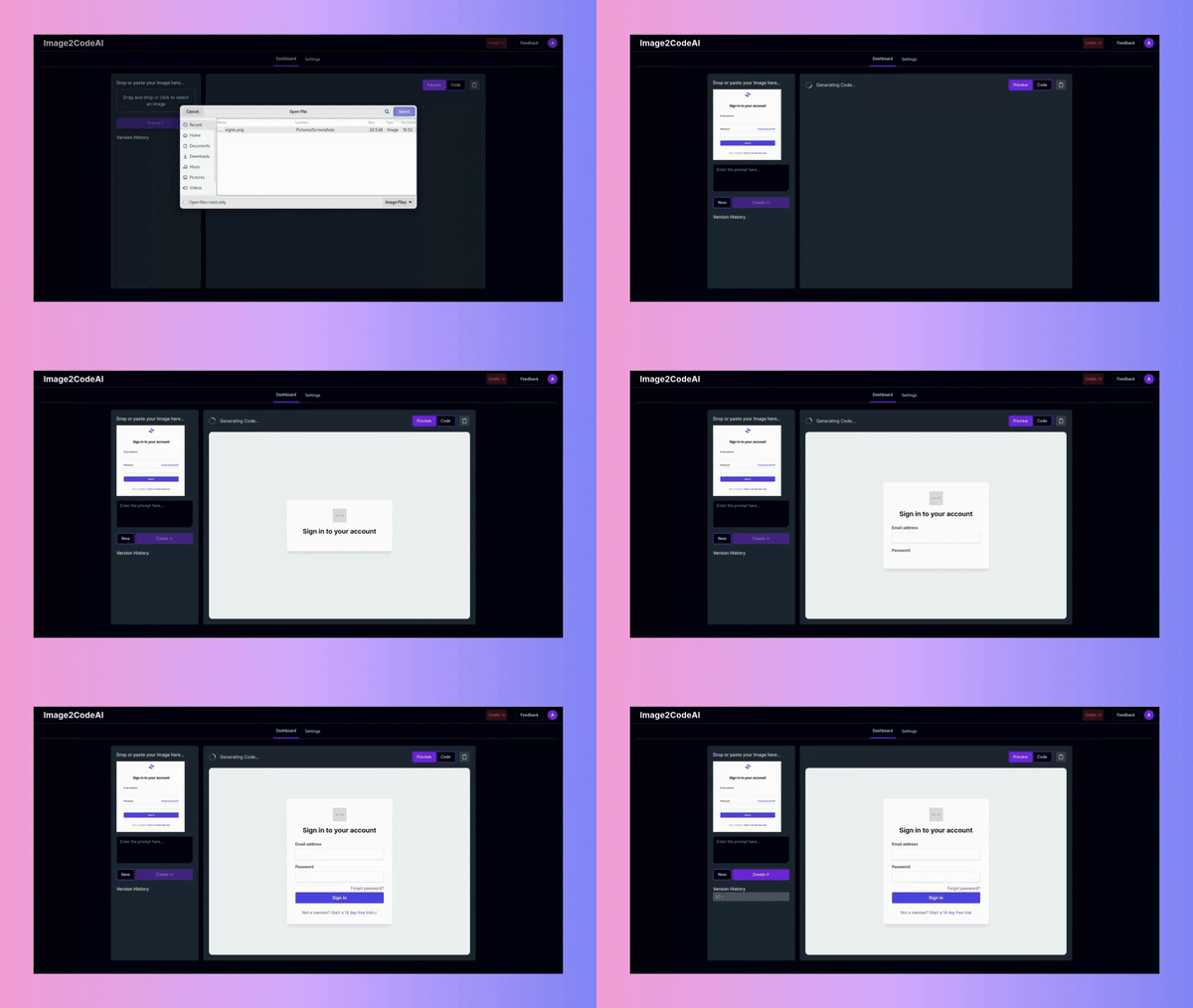
Watch Image2CodeAI transform your design into a complete React component. Our AI generates clean, modern JSX with Tailwind CSS classes that you can drop directly into your project.
- Modern functional components with hooks
- Tailwind CSS utility classes included
- Responsive design out of the box
- Compatible with Next.js, Vite, CRA
How to Convert Image to React
Transform any design into a production-ready React component in four simple steps.
Upload Your Design
Upload any design image, whether it's a Figma export, screenshot, wireframe, or even a hand-drawn sketch. We support PNG, JPG, WEBP, and other common formats.
Select React + Tailwind
Choose 'React + Tailwind' as your output format. This generates a complete React functional component with Tailwind CSS classes for styling.
Generate Your Component
Click Generate and watch the AI analyze your design. In seconds, you'll see a live preview of the React component alongside the original design.
Customize and Export
Use prompts to refine the component: 'add props for customization', 'extract button as separate component', 'add dark mode support'. Then copy the JSX code to your project.
Popular Use Cases
Discover how React developers use Image2CodeAI to accelerate their component development workflow.
Rapid Prototyping
Transform wireframes and mockups into working React prototypes in minutes. Perfect for validating design concepts quickly with stakeholders.
- Quick iteration cycles
- Interactive prototypes
- Easy to modify and extend
Design System Components
Convert design system elements into reusable React components. Build out your component library faster by starting with AI-generated foundations.
- Consistent implementation
- Faster component creation
- Easy to maintain patterns
Legacy UI Migration
Modernize legacy interfaces by converting screenshots to React components. Great for rebuilding old applications with modern technology.
- Visual consistency preserved
- Modern React patterns
- Gradual migration path
Works With Your Stack
Generated React components work with all popular React frameworks and build tools.
Next.js
Drop components directly into Next.js pages or the app directory
Vite
Works seamlessly with Vite-powered React projects
Create React App
Compatible with CRA projects out of the box
Remix
Use generated components in Remix routes and layouts
What You Get
Every generated React component includes these features to ensure production readiness.
Functional Components
All components use modern React functional component syntax with hooks. No class components or outdated patterns.
Tailwind CSS Styling
Styling uses Tailwind CSS utility classes for consistent, maintainable, and responsive designs without separate CSS files.
Performance Optimized
Generated components follow React best practices for performance, including proper key usage in lists and efficient rendering patterns.
Clean, Readable Code
Code is well-formatted, properly indented, and easy to understand. Perfect for teams with code review processes.
Frequently Asked Questions
Common questions about converting images to React components.